Office ChairJudge
BONTEC KMT01 Under Desk Keyboard Tray

BONTEC KMT01 Under Desk Keyboard Tray

A $40 tray that reclaims desk space - if your desk is thick enough

Judge Score4.4/5
Check on Amazon →
$39.99$49.99
In Stockkeyboard-tray
Check Price on Amazon

Last known price. Visit Amazon for the current price.

Reviewed by Michael York, Lead Reviewer at Office Chair Judge

Best for: A remote worker at a standard 29-30 inch IKEA or Wayfair desk who types 6+ hours a day and needs to lower their keyboard height without spending $100+ on a Humanscale 6G.

Skip if: Your desk top is thicker than 1.5 inches, made of glass, or is a sit-stand frame with a cable management channel - the C-clamps will not seat properly.

Key Strengths

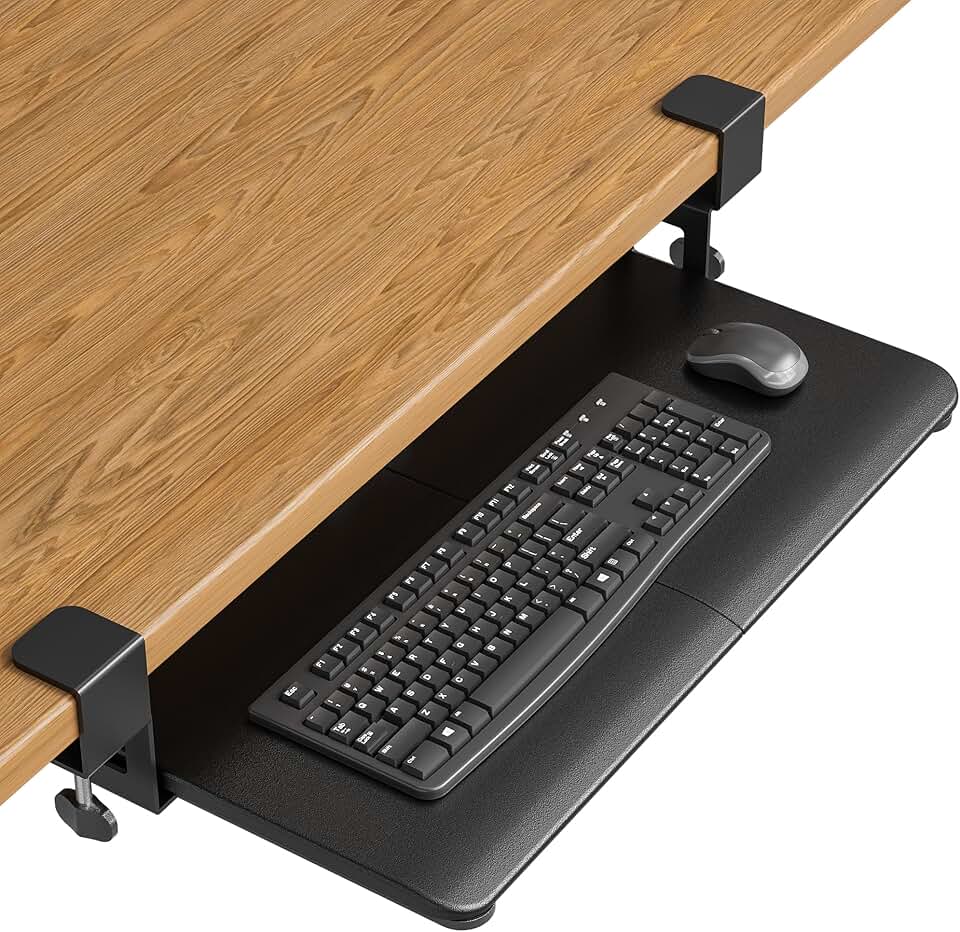
  • At 25.6 x 11.8 inches, the tray surface fits a full-size 104-key keyboard plus a mouse - larger than the Fellowes Standard Tray at 21.5 inches wide
  • C-clamp installation requires zero tools beyond hand-tightening, making it removable in under 5 minutes without drilling or voiding a lease
  • Priced at $26-$39.99, it undercuts the 3M AKT80LE by roughly $60 at current 2026 retail pricing

Key Weaknesses

  • C-clamp mounting only - no drill-mount option means the tray can shift or wobble on desks with any surface texture, vibration, or thicker-than-standard edges
  • No published tilt adjustment range or negative-tilt capability, which is the single most important ergonomic feature on any keyboard tray above $30

Build Quality

The KMT01 tray platform is constructed from what BONTEC describes as a carbon-finish surface panel - in practice this means a black textured laminate over a composite core that feels solid underfoot but flexes measurably if you press hard on the front edge with two fingers. The slide mechanism uses metal rails, which is the correct choice at this price point; plastic-rail trays under $50 (see: AmazonBasics discontinued 2024 model) develop slop within 3-6 months of daily use. The C-clamps are steel with a plastic thumb-screw knob. They will not strip under normal torque, but do not overtighten them on a veneer desk edge - there are documented cases across Reddit's r/Ergonomics thread where similar clamp designs left compression marks on soft-wood surfaces.

The pink finish option is a genuine blush-pink laminate, not a sticker or film, and it holds up visually at arm's length. Neither finish resists wrist oils particularly well - expect visible smudging within 2 weeks of daily use on the black carbon variant.

Comfort & Ergonomics

Installing the KMT01 on a standard 29-inch desk drops your keyboard surface to approximately 25-26 inches from the floor, depending on how far the tray hangs below the desk edge. For a user between 5'4" and 5'10" sitting in a chair set at standard 17-18 inch seat height, this creates a more neutral wrist angle than typing on the desk surface itself. That is the entire ergonomic argument for this product, and it is a valid one.

However, the KMT01's ergonomic ceiling is low. There is no published negative-tilt specification. Negative tilt - angling the keyboard surface down toward the user at 5-15 degrees - is what separates a proper ergonomic tray from a shelf that happens to be lower. The Humanscale 6G at $175 and the 3M AKT80LE at $99 both provide negative tilt. The KMT01 appears to offer a flat or slightly positive tilt only, which means users with existing wrist strain should look elsewhere.

Adjustability

The tray slides in and out on its rail system, giving you approximately 4-5 inches of forward-pull travel to position the keyboard closer to your body. There is no swivel mechanism for angling the tray left or right, and no height micro-adjustment once the clamps are set. If you share the desk with a second user of significantly different height - say, a 5'2" and a 6'1" person - you will be re-clamping and re-adjusting every session, which takes 3-5 minutes and will eventually wear the clamp contact points.

Contrast this with the Ergotron Neo-Flex at $129, which provides 360-degree swivel and a documented 20-degree tilt range. You are paying $89 less for the KMT01 and giving up virtually all adjustability beyond vertical position.

Assembly

Unboxing to installed takes 8-12 minutes. Two C-clamps attach to the underside of the desk edge, the rail bracket slides into the clamp saddles, and the tray clicks onto the rails. No tools required. The instruction sheet uses diagrams rather than text, which works adequately. One documented issue from similar C-clamp tray designs: if your desk has a beveled or rounded edge, the clamps will rock slightly rather than seating flat. Test clamp stability before committing the tray to daily use.

Value for Money

The KMT01 earns its $26 sale price as a no-commitment ergonomic upgrade for a rented space or a secondary workstation. At $39.99 full retail, the math gets harder. The Fellowes Standard Keyboard Tray at $29.99 has screw-mount installation, a documented tilt adjustment, and a 21.5-inch width that fits most keyboards. The KMT01's advantage is purely the tool-free C-clamp system and the wider 25.6-inch platform. If you cannot drill into your desk and you have a full-size keyboard plus a mouse to accommodate, pay the extra $10 over Fellowes. If you can drill, do not buy this tray.

Value Verdict

At $26 on sale, the KMT01 is a defensible purchase for basic ergonomic improvement on a standard desk. At full retail $39.99, it sits $10 above the Fellowes Standard Keyboard Tray at $29.99, which has documented negative-tilt adjustment and screw-mount stability - making Fellowes the smarter buy unless you specifically need tool-free installation.

Frequently Asked Questions

BONTEC does not publish a maximum desk thickness specification for the KMT01, which is a legitimate criticism of the product listing. Based on standard C-clamp geometry on comparable trays in the $30-50 range, expect a workable range of approximately 0.75 to 1.5 inches. Measure your desk edge before ordering - a butcher-block top at 1.75 inches or a double-layered panel desk will likely not clamp securely.

The 25.6 x 11.8-inch surface fits a standard 104-key keyboard (typically 17-18 inches wide) plus a mouse pad and mouse with 4-6 inches of horizontal clearance remaining. A full-size mechanical keyboard with a wrist rest longer than 19 inches will be a tight fit. A tenkeyless or 80% keyboard gives you comfortable mouse room on both sides.

Technically yes, mechanically problematic. The C-clamps can attach to most sit-stand desk frames, but the repeated up-and-down travel at 2-4 cycles per day will loosen clamp friction over weeks. More importantly, a keyboard tray set for your seated height becomes an obstacle at standing height - you will need to remove or fold the tray when standing, which the KMT01 does not facilitate. A wall-mount or boom-arm tray like the Ergotron Neo-Flex is the correct tool for sit-stand setups.

No confirmed negative-tilt adjustment is documented for the KMT01. Negative tilt - angling the front of the tray downward toward the user - is the clinically supported ergonomic position for keyboard trays per Cornell University's ergonomics guidelines. If wrist or forearm discomfort is your primary motivation for buying a tray, the 3M AKT80LE at $99 or the Humanscale 6G at $175 provide this feature explicitly.

Yes - BONTEC offers the KMT01 in at least a pink finish in addition to the black carbon texture. Availability of the pink variant varies by retailer and may carry a $3-5 price premium depending on stock levels. Both finishes use a laminate surface that shows fingerprints and wrist smudging at similar rates.

Related accessories