Office ChairJudge
TechOrbits Standing Desk Converter
TechOrbits

TechOrbits Standing Desk Converter

A $99 gas-spring converter that earns its keep - for one monitor

Judge Score4.6/5
Check on Amazon →
$99.99$129.99
In Stockconverter
Check Price on Amazon

Last known price. Visit Amazon for the current price.

Reviewed by Michael York, Lead Reviewer at Office Chair Judge

Best for: A single-monitor home office worker between 5'4" and 6'0" tall who owns an existing desk and wants sit-stand capability for under $130 without committing to a full desk replacement.

Skip if: You use two monitors, have a keyboard that weighs more than 4 lbs, or need stability during fast typing at maximum height - the wobble at 19.7" will drive you to return it within a week.

Best For

A single-monitor home office worker between 5'4" and 6'0" tall who owns an existing desk and wants sit-stand capability for under $130 without committing to a full desk replacement.

Skip If

You use two monitors, have a keyboard that weighs more than 4 lbs, or need stability during fast typing at maximum height - the wobble at 19.7" will drive you to return it within a week.

Comparison

The $104.99 Flexispot 30" U-Shape offers a more versatile removable keyboard tray for $5 more, making it the stronger pick if tray flexibility or slightly higher keyboard clearance matters to your setup.

Key Strengths

  • Gas-spring lift covers 4.3" to 19.7" - enough range for a full sit-to-stand transition for users 5'4" to 6'0" tall without tools or buttons
  • 3-year warranty on a sub-$130 product puts it ahead of several competitors at the same price point, including the $104.99 Flexispot U-Shape
  • Ships pre-assembled in most configurations, meaning setup takes under 10 minutes versus the 30-45 minutes typical of full desk frames

Key Weaknesses

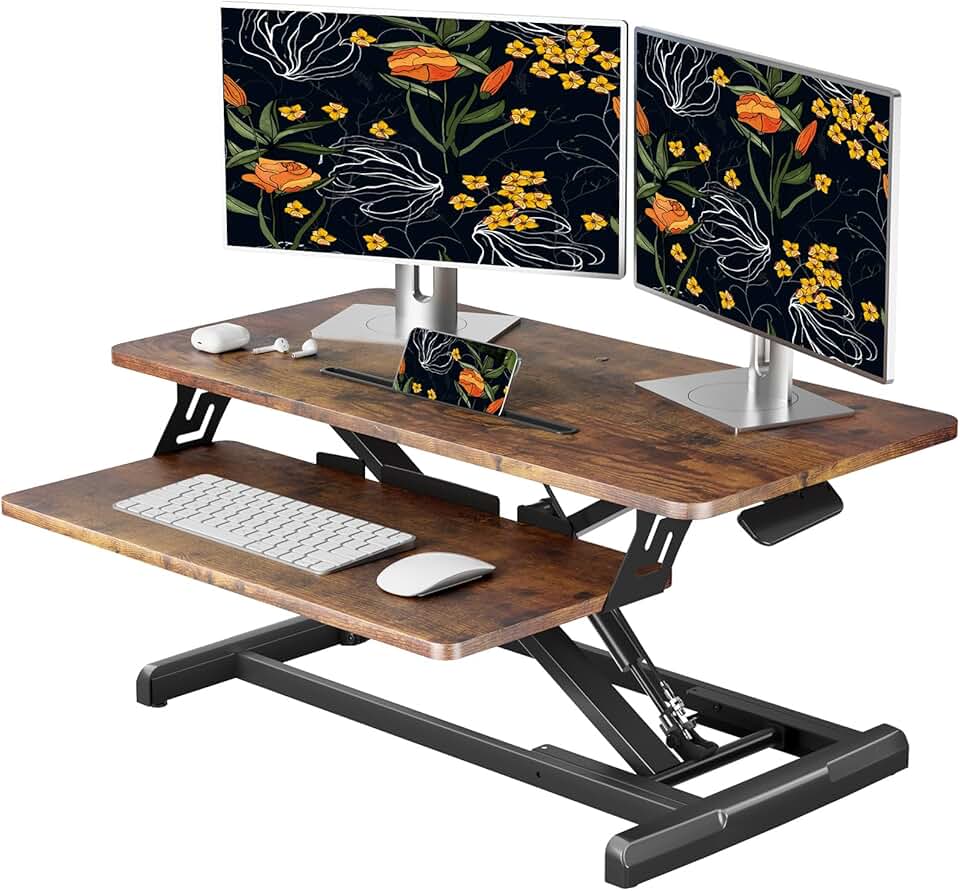
  • The 31.5" x 15.7" desktop surface is physically too small for dual monitors - two standard 24-inch displays require at least 48 inches of width
  • At maximum 19.7" extension, the single pneumatic spring produces noticeable wobble during typing - a structural issue TechOrbits only resolved in the pricier Rise-X Pro line

Full Specifications

SpecificationDetails
Current Price$99.99

Build Quality

The TechOrbits OF-S05-1 uses a particle board MDF desktop surface and a steel base frame. That combination is honest for a $99 product - it is not the same as a solid wood or aluminum desktop, and you will notice it if you press hard into the corners. The particle board top can dent under sustained point pressure, which matters if you use a monitor arm clamp rather than a stand. The steel base is the stronger element here; it holds the pneumatic column and bears the full 33 lb desktop load without flexing at mid-range heights. At 19.7" of extension, that story changes - the single-spring design introduces lateral movement during typing that heavier users will feel immediately. TechOrbits addressed this in the Rise-X Pro (OF-S06-2) with an alloy steel anti-wobble base, but that model costs more and is sold separately. Salvage stock at $69 from outlets like SalvageCoFishers exists for the white 32" variant, but condition varies and the 3-year warranty may not transfer - factor that in before saving $30.

Comfort and Ergonomics

The 4.3" to 19.7" lift range accommodates users from roughly 5'4" to 6'0" in both seated and standing positions without awkward wrist angles, assuming a standard 30" desk underneath. Users taller than 6'2" will hit the 19.7" ceiling before reaching a neutral elbow position while standing. The two-tier layout - 31.5" x 15.7" main surface above, 25.4" x 11.8" keyboard tray below - creates the correct monitor-to-keyboard offset for most ergonomic setups. The keyboard tray's 4.4 lb limit is the single most underappreciated spec on this product. A Logitech MX Keys weighs 2.0 lbs. Add a wired mouse at 0.3 lbs and you have 2.3 lbs remaining. A heavier gaming keyboard like the Corsair K100 at 2.6 lbs leaves virtually no margin - and tray instability at weight limits creates a distracting bounce during keystrokes.

Adjustability

Adjustment is fully manual via a squeeze-handle pneumatic mechanism. Squeeze the lever, apply slight upward pressure, and the platform rises smoothly. Lower it by squeezing and pushing down. There are no motors, no power cables, no apps, and no calibration. That simplicity is a genuine advantage for office environments where electrical outlets near desk surfaces are limited. The full range from 4.3" to 19.7" covers 15.4 inches of travel, which TechOrbits claims supports a complete sit-to-stand transition - and for users in the 5'4" to 6'0" range, that claim holds. One-handed operation works reliably at mid-range heights; at the maximum extension, two hands on the platform give better control. The mechanism requires no tools and no adjustment period; it works correctly on the first use.

Assembly

The OF-S05-1 ships largely pre-assembled. Most buyers report being ready to use the converter within 10 minutes of opening the box, with attachment of the keyboard tray being the only real assembly step. The Rise-X Pro models are also pre-assembled per TechOrbits spec sheets. Compare this to building a Flexispot E7 full frame, which takes 45 to 90 minutes and requires two people for the tabletop attachment. If your time has any value, the pre-assembly alone offsets a portion of the price premium this product carries over lowest-tier converter options.

Value for Money

At $99.99 - or $129.99 from Walmart and Newegg in 2026 - the TechOrbits OF-S05-1 sits in a competitive window. The $104.99 Flexispot 30" U-Shape (currently discounted from $139.99 at Walmart) is its most direct rival: similar gas-spring mechanism, comparable height range, but a U-shaped tray design that accommodates keyboards and mice with slightly more lateral freedom. The Wayfair adjustable metal base at $132.99 carries a 4.8 out of 5 rating and an all-metal build, but does not include a keyboard tray at all. For a buyer who wants one keyboard tray, one monitor, and a no-tools setup under $130, the TechOrbits hits the target. For anyone who suspects they might want a second monitor or a heavier keyboard within 12 months, spend the extra money now on the Rise-X Pro 37" variant and avoid the return process entirely.

Value Verdict

At $99.99, the TechOrbits OF-S05-1 delivers genuine gas-spring sit-stand functionality at a price that undercuts most motorized options by $200 or more, making it a rational buy for light single-monitor setups. The $104.99 Flexispot 30" U-Shape is only $5 more and includes a more versatile removable keyboard tray, so if tray flexibility matters to you, Flexispot edges this out at nearly the same price.

TechOrbits Standing Desk Converter

Check the latest price and availability on Amazon

Check Price on Amazon

Frequently Asked Questions

No. Two standard 24-inch monitors require roughly 44 to 48 inches of combined width on their stands, and the OF-S05-1 desktop is 31.5 inches wide. You would need the TechOrbits Rise-X Pro 37-inch or 42-inch variant for a dual-monitor setup. Using monitor arms instead of stands does not solve the problem - the 33 lb desktop weight limit becomes the binding constraint with two screens.

It depends on the keyboard. The tray is rated to 4.4 lbs across its 25.4" x 11.8" surface. A Logitech MX Keys mechanical-style board weighs 2.0 lbs; a standard wireless mouse adds roughly 0.2 to 0.3 lbs, leaving 2.1 lbs of margin. A heavier board like the Corsair K100 at 2.6 lbs leaves under 2 lbs for a mouse and wrist rest combined - manageable, but approaching the limit. Consistently exceeding the 4.4 lb rating accelerates wear on the tray hinge.

For light typists who press keys gently, the wobble at 19.7" is minor and mostly noticeable when the monitor sways slightly during faster typing bursts. For users who type with heavy hand pressure or who move their mouse aggressively, the lateral movement becomes distracting within the first week. TechOrbits resolved this structurally in the Rise-X Pro (OF-S06-2) with an anti-wobble alloy steel base, so if you plan to stand frequently, the Pro is a better long-term investment.

The 19.7-inch maximum extension is appropriate for users up to approximately 6'0" tall, assuming the converter sits on a standard 30-inch desk (total standing surface height of roughly 49.7 inches). Users at 6'2" or taller will likely find their elbows must angle downward to reach the keyboard, creating wrist strain during extended sessions. If you are over 6'1", measure your ideal standing keyboard height before purchasing and verify it falls within the 34.3" to 49.7" total range this unit provides on your specific desk.

Only if you can inspect the pneumatic spring mechanism before purchasing. The single gas spring is the most wear-sensitive component on the OF-S05-1, and salvage-condition units may show reduced lift force or inconsistent height-holding after prior use. The 3-year warranty likely does not transfer from salvage outlets, meaning a faulty spring costs you a replacement unit rather than a warranty claim. At a $30 to $60 savings over the $99 to $129 retail price, it is a reasonable gamble for a secondary or guest workstation, but not for a primary daily-use setup.

You Might Also Consider