Office ChairJudge
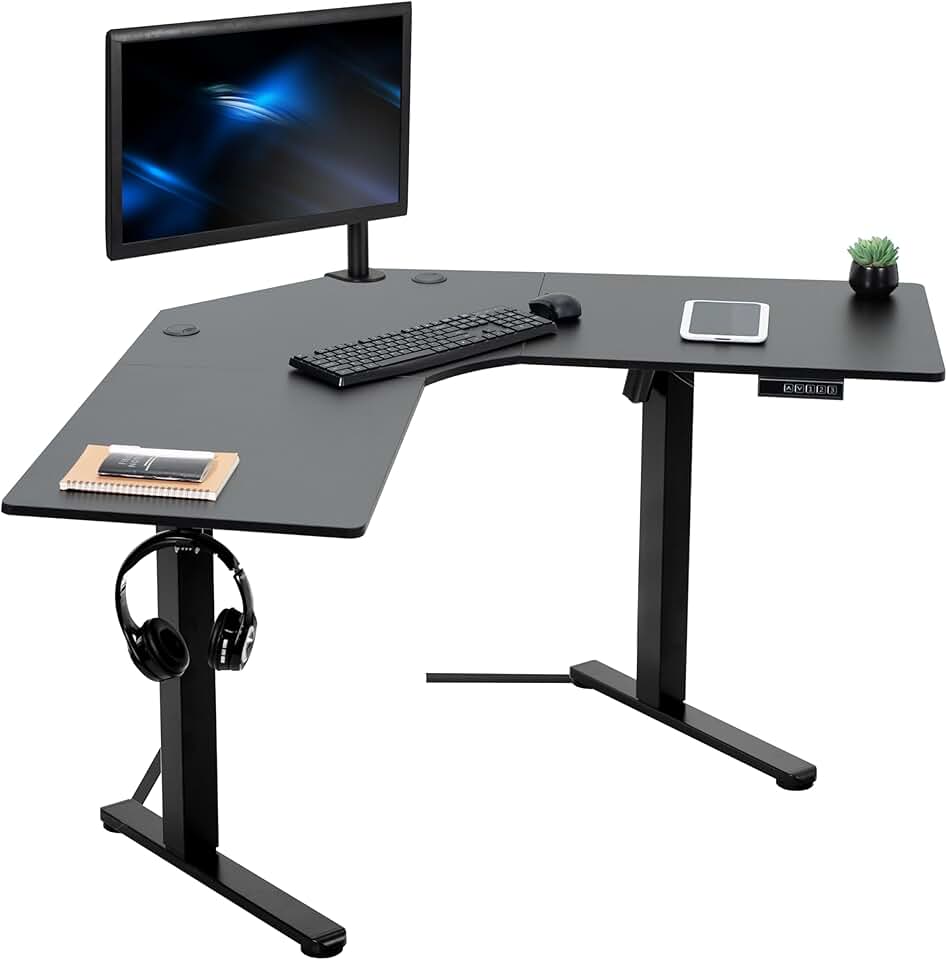
VIVO Electric Corner L-Shaped 47 x 47 in Standing Desk
VIVO

VIVO Electric Corner L-Shaped 47 x 47 in Standing Desk

A $200 electric L-desk that actually holds 154 lbs without apology

Judge Score4.2/5
Check on Amazon →
$199.99
In Stockelectric
Check Price on Amazon

Last known price. Visit Amazon for the current price.

Reviewed by Michael York, Lead Reviewer at Office Chair Judge

Best for: A 5'5"-6'1" remote worker setting up a corner home office under $200 who needs dual-monitor space and basic sit-stand switching without enterprise-grade engineering.

Skip if: You're taller than 6'2", regularly load more than 130 lbs of equipment, or expect the lateral stability of a dual-motor frame - this single-motor desk will disappoint you at standing height.

Best For

A 5'5"-6'1" remote worker setting up a corner home office under $200 who needs dual-monitor space and basic sit-stand switching without enterprise-grade engineering.

Skip If

You're taller than 6'2", regularly load more than 130 lbs of equipment, or expect the lateral stability of a dual-motor frame - this single-motor desk will disappoint you at standing height.

Comparison

The VIVO 63x55 Electric L-Shaped Desk at roughly $250 delivers 225 lbs capacity and 16 extra inches of surface area for $50 more - it's the better desk if your corner and budget allow it.

Key Strengths

  • At $199.99, it undercuts comparable electric L-shaped desks like the VIVO 63x55 (~$250) by $50 while still delivering 3 memory presets and a steel frame
  • The 47.2" x 47.2" corner surface comfortably fits dual 27-inch monitors plus a laptop and peripherals without crowding
  • A 3-year warranty and 30-day returns from VIVO back a desk that carries 4.8/5 stars across 27+ reviews on Walmart

Key Weaknesses

  • The 46.5" maximum standing height excludes users over roughly 6'2", making this a poor fit for taller buyers despite the electric price pitch
  • A single motor and 0.5"-thick particle board top mean this wobbles more at full extension than dual-motor competitors like the Flexispot E7 Pro, which starts at $499

Full Specifications

SpecificationDetails
Current Price$199.99

Build Quality

The all-steel frame is the headline at this price. The 2.4"-wide legs don't flex noticeably under a dual-monitor setup within the 154 lb weight limit, and the base footprint of 38.2" x 22.8" keeps the desk from rocking when you bump the corner. The 3-part particle board top - finished in White, Vintage Brown/Black, or Light Wood/White - is the obvious cost-cutting measure. At 0.5" thick, it's thinner than the 0.75" MDF tops you get on desks at $299+, and it will show edge wear within 12-18 months of regular use if you're not careful with cable trays and peripherals. The assembled weight of 60.7 lbs suggests VIVO didn't cheap out on the steel components even if the top is entry-level. For a home office running two 27-inch monitors and a laptop dock under 130 lbs total, this frame will not embarrass you.

Comfort & Ergonomics

The L-shape is genuinely useful here, not just a marketing angle. The 18.7" side width on each arm gives you enough depth to push a monitor back 24" from eye level on one side while keeping a keyboard and mouse on the other. For users between 5'4" and 6'2", the 28.5"-46.5" height range covers both seated desk work (standard 29"-30" desk height) and a standing position without compromise. A 5'10" user needs a standing height of roughly 44"-45" - this desk gets there with 1.5" to spare. If you're 6'3" or above, the 46.5" ceiling means you'll be slightly hunched standing, which defeats the ergonomic purpose entirely.

Adjustability

The electric motor moves at 25mm per second with less than 55dB of noise - quieter than a normal conversation, which matters in shared living spaces. The 3 memory presets are a legitimate quality-of-life feature at this price point: set preset 1 for sitting, preset 2 for standing, and you're done. No holding a button while the desk crawls up and you stand there watching it. The push-button controller is basic but reliable - there's no app, no Bluetooth pairing, no firmware updates, which at $199.99 is a feature, not a limitation. The desk runs on 100V-240V power, so international users buying through US retailers can use it abroad with an appropriate adapter.

Assembly

VIVO ships this with all required hardware and an instruction sheet. Expect 45-90 minutes for one person working carefully, or 30 minutes with a second set of hands. The 3-part top requires alignment before securing to the frame, which is the step where solo assemblers lose time. No specialized tools are needed beyond what's included. The 60.7 lb total weight means moving the assembled desk into position is a two-person task - plan accordingly before you start. No widespread reports of missing hardware or misaligned pre-drilled holes have surfaced in the 2026 review pool, which is a better track record than several competitors in the $200-250 range.

Value for Money

At $199.99 with free shipping from Walmart, Wayfair, and VIVO's own site, this desk occupies a price point with no direct electric L-shaped competitor of equivalent quality. The closest comparison is the VIVO 63x55 at roughly $250, which delivers 225 lbs capacity and a larger surface - if your corner allows 63 inches of run, that $50 is worth spending. If your corner is tight and your load is light, the 47x47 at $199.99 is the correct purchase. Generic Walmart L-shaped electric alternatives in the $180-220 range don't offer the same steel frame quality or a 3-year warranty, which matters when you're buying something you'll adjust 4-6 times a day. The 4.8/5 rating across Walmart's verified buyers and VIVO's 30-day return policy remove most of the financial risk from this decision.

Value Verdict

For $199.99, no other electric L-shaped desk in the US market gives you this much surface area with a steel frame and memory presets - it's a legitimate buy if your needs are modest. The VIVO 63x55 at ~$250 is worth the $50 premium if you need 225 lbs capacity or work standing more than 3 hours a day.

VIVO Electric Corner L-Shaped 47 x 47 in Standing Desk

Check the latest price and availability on Amazon

Check Price on Amazon

Frequently Asked Questions

No - the maximum standing height of 46.5" falls short of the roughly 47.5"-48" standing desk height recommended for a 6'3" user. You'll be working with a slight downward hunch at full extension, which negates the ergonomic benefit of standing. Look at the VIVO 63x55 model, which reaches 46.8" and has a heavier frame to match.

Three 24-inch monitors in a flat arc will fit within the 47.2" x 47.2" surface, but three 27-inch monitors will be tight and push you toward the 154 lb weight limit quickly once you add a laptop dock, speakers, and accessories. A triple-monitor arm rated for 33 lbs or more will help consolidate footprint. If triple 27-inch displays are your setup, the VIVO 75x63 with its 225 lb capacity is a safer choice.

VIVO rates the motor at under 55dB, which is roughly the volume of a quiet conversation or a moderate rainfall. In a home office, you'll hear it but it won't disrupt a video call or a sleeping partner in the next room. It is a single motor, so it's slightly louder than the dual-motor setups on desks like the Flexispot E7 Pro, but at $199.99 versus $499, that's an expected trade-off.

For the first 2-3 years with normal use - monitors, keyboard, a drink or two - the 0.5" particle board top holds up fine. The laminate finish on the White and Light Wood variants resists minor scratches but will show edge chipping if you drag heavy peripherals across the surface repeatedly. Adding a desk pad over the primary work arm extends the top's life significantly and costs about $20-30.

At 46.5" with a typical dual-monitor load under 100 lbs, there is minor wobble when you bump the desk or type heavily - this is the physical reality of a single-motor frame extended to near-maximum height. It's not dangerous and won't tip, but it's noticeable. If you type with significant force or use a mechanical keyboard, you'll feel it. Dual-motor desks like the Flexispot E7 at $499 eliminate most of this, but that's a $300 premium for the fix.

Featured in our guides

You Might Also Consider