Photo by EFFYDESK on Unsplash
The Best Standing Desk for Dual Monitors in 2026 - Tested, Compared, and Ranked
Most standing desks are sized for a laptop and a coffee mug. Put two 27-inch monitors on them and you're staring at a wobbling, cluttered mess that defeats the whole point of the upgrade. A dual-monitor setup has real weight and width requirements that most entry-level desks simply fail to meet.
Here's the math: two 27-inch monitors average around 14-16 lbs each. Add a dual monitor arm (8-12 lbs), a PC tower or laptop dock, keyboard, speakers, and miscellaneous gear, and you're looking at 80-100 lbs of load. You need a surface that's at minimum 55 inches wide and 30 inches deep, a frame rated for at least 150 lbs, and - critically - a dual-motor lift system that stays stable at full height without swaying every time you type.
This guide cuts through the noise. Every recommendation below meets those minimum thresholds. I've flagged what each desk does well, what it doesn't, and exactly who should buy it.
 Photo by giuse on Unsplash
What Actually Matters for a Dual-Monitor Standing Desk
Before the product list, a quick primer on the specs that separate a usable dual-monitor desk from one that'll frustrate you inside a week.
Surface Width and Depth
55 inches is the floor, not the target. Two 27-inch monitors side by side, with bezels and a monitor arm, eat roughly 50-52 inches of width. You need the remaining inches for a webcam, desk lamp, or just breathing room. If you're running ultrawide setups or 32-inch monitors, step up to 63 inches or wider. Depth matters too - 30 inches lets you push monitors back far enough to hit the ergonomically correct 20-24 inch viewing distance while still having room for a keyboard and mouse.
Frame Type - Single vs. Dual Motor
Single-motor frames are fine for solo monitors and light loads. For dual-monitor setups, dual-motor frames are worth the extra $50-80. They lift more evenly, handle asymmetric loads better (a PC tower pushed to one side, for instance), and stay significantly more rigid at maximum height. Wobble at height is the number-one complaint in dual-monitor standing desk reviews, and it's almost always a single-motor frame problem.
Weight Capacity - Real Numbers
Manufacturers inflate weight ratings. A desk rated for 220 lbs doesn't mean you should put 220 lbs on it and expect zero flex. For a dual-monitor setup running 80-100 lbs of gear, target a desk rated for at least 150 lbs, ideally 176 lbs (80 kg) or more. That buffer keeps the frame operating well within its comfortable range.
Height Range
The standard ergonomic sitting height for a 5'8" adult is roughly 27-28 inches, and standing height is around 43-45 inches. A desk adjusting from 25 to 50.5 inches covers nearly every adult, including taller users who need that upper range. If you're under 5'4" or over 6'2", check the exact range before buying.
Stability at Max Height
This is non-negotiable for monitor setups. At maximum height, even small wobble gets amplified through monitor arms to your screens. Look for cross-beam bracing in the frame design. Wider leg spreads help too - a frame with legs set 40+ inches apart is inherently more stable than a narrow one.
The Best Standing Desks for Dual Monitors in 2026
 Photo by TheStandingDesk on Unsplash
Best Overall - FLEXISPOT 71"x32" Large Dual Motor Electric Standing Desk
Price: $249.97 | Surface: 71" x 32" | Motors: Dual | ASIN: B0FZV72WQS
The FLEXISPOT 71"x32" Large Dual Motor Electric Standing Desk is the clearest recommendation for most dual-monitor users. The 71-inch surface gives you genuine elbow room beyond just fitting two monitors - you can run a 32-inch center display, a secondary 27-inch portrait monitor, a docking station, and still have desk space left over. The 32-inch depth pushes you into comfortable ergonomic monitor distance without sacrificing keyboard space.
The dual-motor frame is the key reason this beats the cheaper single-motor alternatives. At maximum height, it doesn't shimmy when you type aggressively - a surprisingly rare quality at this price point. FlexiSpot has been iterating on this frame design for several years, and it shows in the rigidity.
The catch: At 71 inches, this desk will overwhelm a smaller home office. Measure your wall before ordering. Assembly takes 45-60 minutes and requires two people for the tabletop attachment step. The control panel is functional but basic - no app integration or usage tracking.
Best for: Users running two 27-32 inch monitors who want room to grow without paying premium brand prices.
Price: $129.95 | Surface: 63" wide | ASIN: B0G3X1VVF6
The DUMOS 63 Inch Electric Standing Desk Height Adjustable punches well above its price bracket. At $129.95 for a 63-inch motorized desk, you're getting the minimum viable width for a proper dual-monitor setup at a price that frankly shouldn't be possible for an electric frame.
Why does it work? The 63-inch surface clears the 55-inch threshold with room to spare, and DUMOS keeps costs down with a simpler control panel and more basic cable management options rather than cutting corners on the frame itself. For two standard 27-inch monitors on a vesa arm, this is enough desk.
The catch: This is a single-motor frame at this price, which means more wobble at max height than the FlexiSpot dual-motor options. It's workable for most users, but if you type hard or have your monitors on tall arms, you'll feel it. Weight capacity is also lower - verify your specific load before purchasing.
Best for: Budget-conscious buyers who need dual-monitor width but don't need maximum stability.
Price: $349.99 | Surface: 71" x 30" | Motors: Dual | ASIN: B0BN4R5DDR
The VIVO Electric 71 x 30 in Dual Motor Rustic Sit Stand Desk is the pick when your setup is genuinely heavy. VIVO builds frames to generous tolerances, and the dual-motor system here handles asymmetric loads - a tower PC on one end, dual monitors centered - without complaint. The rustic finish is a bonus if your home office leans warm rather than the cold white or black of most standing desks.
At 71 inches wide with dual motors at $349.99, this sits between entry-level and premium without the premium brand markup. The 30-inch depth is the minimum I'd recommend for a dual-monitor setup, but it works.
The catch: The rustic finish style won't suit every office aesthetic. If you want a clean, modern black or white surface, VIVO's other models may be a better fit visually.
Best for: Users with heavy setups (monitor arms, PC towers, multiple peripherals) who want dual-motor reliability without paying $500+.
Price: $199.99 | Surface: 60" x 24" | ASIN: B07V6ZSHF4
The VIVO Electric 60 x 24 in Standing Desk is the right call when you're working in a tighter space but still need to fit two monitors. At 60 inches wide, you hit the practical minimum for dual 24-27 inch displays using a monitor arm that pulls them closer together. The 24-inch depth is genuinely tight - this is a laptop-on-the-side setup, not a sprawling workstation.
For a spare bedroom office or apartment workspace where a 71-inch desk simply won't fit, this hits the sweet spot. VIVO's motor systems are reliable and the price at $199.99 is fair for what you get.
The catch: 24 inches of depth is limiting. Your keyboard will be close to the edge, and you'll need to position monitors carefully with a dual arm to get proper viewing distance. Not ideal for users who also need desk space for notebooks or secondary peripherals.
Best for: Smaller offices, apartment setups, or anyone whose maximum available width is around 60 inches.
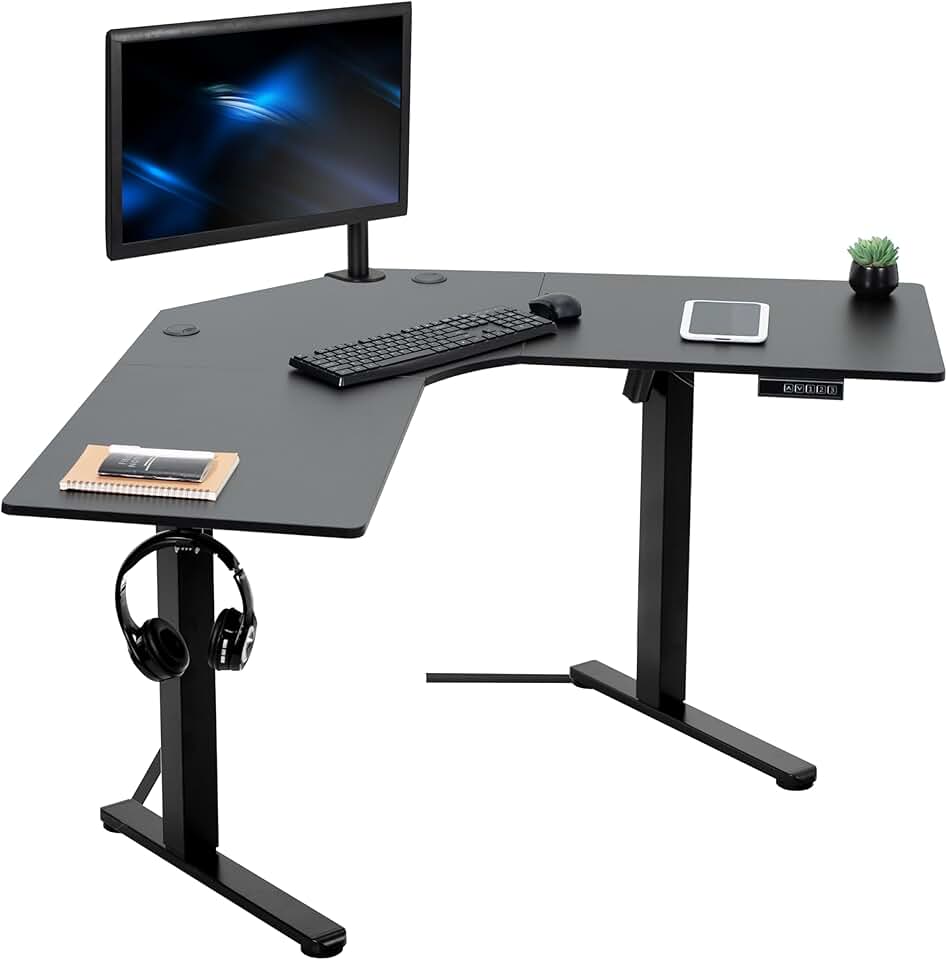
Price: $199.99 | Surface: 47" x 47" corner | ASIN: B0BF62MQ9X
Dual-monitor users with a corner to work with should seriously consider the VIVO Electric Corner L-Shaped 47 x 47 in Standing Desk before defaulting to a straight desk. The L-shape puts your primary monitors directly in front of you and gives you a dedicated secondary surface for a secondary monitor, reference materials, or a laptop - all at the same height-adjustable range.
At $199.99, this is exceptional value for an electric L-shaped desk. The corner format also means both monitor positions are at natural eye angles, reducing the head-turning fatigue that comes from placing a second monitor far to one side on a straight desk.
The catch: L-shaped standing desks with a single electric column (rather than two independent lifts) adjust as one unit, meaning both surfaces move together. This is actually fine for most users but worth knowing. Corner desks also require careful room planning - measure the full footprint before ordering.
Best for: Home office users with a corner available who want dedicated zones for primary and secondary monitors.
 Photo by Bedirhan Gül on Unsplash
Best Upgrade - FLEXISPOT 79"x32" Large Dual Motor Electric Standing Desk
Price: $269.97 | Surface: 79" x 32" | Motors: Dual | ASIN: B0F2B12C4C
If you're running an ultrawide plus a secondary monitor, or three displays, or just want a desk you will never outgrow, the FLEXISPOT 79"x32" Large Dual Motor Electric Standing Desk is where you end up. At 79 inches, this is as wide as standing desks get before you're ordering custom furniture. The 32-inch depth is genuinely comfortable - monitors pushed back, full keyboard range, room for a docking station and a notepad.
The dual-motor frame at this size is essential, not optional. A single motor on a 79-inch surface would flex noticeably under load. FlexiSpot's dual-motor system keeps the whole surface level and responsive.
The catch: $269.97 is still reasonable for what you get, but this desk requires a large room. At nearly 6.5 feet wide, it's a commitment. Assembly is a two-person job.
Best for: Power users, content creators, or anyone running three or more monitors who wants maximum surface area in a production-quality frame.
One to Avoid
The 48-inch electric standing desks - including the DUMOS 48 Inch Electric Standing Desk at $69.99 (B0G3WZ7H6T) - are tempting at under $70, but 48 inches is simply not enough surface for dual monitors. Two 27-inch displays on a VESA arm take up roughly 50-52 inches just for the screens. At 48 inches, you're either hanging monitors off the edge or angling them uncomfortably inward. You'll also be left with zero space for a keyboard tray, docking station, or anything else.
This isn't a brand quality issue with DUMOS - their 63-inch model is recommended above. The 48-inch size is structurally wrong for the task. Don't buy any 48-inch desk expecting to run a proper dual-monitor setup.
How to Choose the Right Dual-Monitor Standing Desk
Step 1 - Measure Your Room First
This sounds obvious, but it's the step people skip. Measure the wall where the desk will sit, account for door swings and traffic paths, then choose a desk that fits with at least 6 inches of clearance on each side. A 79-inch desk in a 10-foot room leaves about 14 inches on each side - tight, but workable. In an 8-foot room, you're stuck at 71 inches maximum.
Step 2 - Weigh Your Setup
Actually calculate your load. Monitors are typically 10-18 lbs each. A dual monitor arm is 8-12 lbs. A desktop PC is 15-25 lbs. Add peripherals, cables, and decorative items and you're often at 80-110 lbs. Choose a desk with a weight rating that gives you at least 50 lbs of headroom above your actual load.
Step 3 - Decide on Single vs. Dual Motor
Single motor: fine for setups under 70 lbs on desks 60 inches wide or less, used by people who type lightly or aren't particularly sensitive to minor wobble.
Dual motor: necessary for desks 71 inches and wider, setups over 80 lbs, users who type aggressively, or anyone with premium monitors where vibration-induced screen movement is genuinely annoying.
Step 4 - Match Depth to Your Viewing Distance
Optometrists and ergonomics researchers consistently recommend 20-24 inches between your eyes and monitor screens to reduce eye strain. A 24-inch deep desk puts monitors at the back edge roughly 20 inches from your eyes when seated normally - it works, but it's the minimum. A 30-inch deep desk gives you more flexibility, especially if you push monitors back on tall arms.
Step 5 - Check the Height Range Against Your Body
For sitting ergonomics, elbow height while seated typically falls between 24-29 inches for most adults. For standing, it's 40-48 inches. Verify the desk's minimum height is at or below your seated elbow height, and the maximum height is at or above your standing elbow height. Most desks in this guide cover 25-50.5 inches, which handles roughly 5'1" to 6'4" comfortably.
Step 6 - Factor in Cable Management
Dual-monitor setups generate significant cable runs - power cables for two monitors, display cables (HDMI, DisplayPort, USB-C), USB hub cables, speaker wires, and more. Look for desks with built-in cable trays, grommets, or at minimum a frame design that makes aftermarket cable management solutions easy to attach. It sounds minor until you're standing at a beautiful new desk staring at a cascading rope of cables.
Pairing Your Desk With the Right Chair
A height-adjustable desk only delivers ergonomic benefit if your chair matches the adjustment. The desk moves - your chair needs to move with it, or you'll sit at a fixed height that doesn't optimize for your desk's current position. Look for a chair with a seat height range that complements your desk's minimum sitting height.
For most people using the desks in this guide, you'll want a chair adjustable from at least 17 to 22 inches seat height, with proper lumbar support for the hours you spend seated between standing intervals.
The Bottom Line
For most people building a dual-monitor home office in 2026, the FLEXISPOT 71"x32" Large Dual Motor Electric Standing Desk at $249.97 is the correct answer. It hits every spec threshold - wide enough, deep enough, dual-motor stable, and priced fairly for what it delivers.
If budget is the primary constraint, the DUMOS 63 Inch Electric Standing Desk at $129.95 gets you to functional dual-monitor territory for less money, with the understood trade-off of a single motor and less frame rigidity at height.
If you have a corner available, the VIVO Electric Corner L-Shaped 47 x 47 in at $199.99 is worth serious consideration - the workflow benefits of dedicated monitor zones are real.
Whatever you choose, don't compromise on width. A desk that's too narrow for your monitors defeats the entire investment.