Photo by Tahmied Hossain on Unsplash
The Best L-Shaped Desks for Home Office in 2026 - Tested by Size, Budget, and Use Case
An L-shaped desk solves a real problem: you need more surface area without turning your home office into a warehouse. The corner format gives you a dedicated monitor zone, a writing or paperwork zone, and enough room to spread out without the footprint of a full executive suite. But the market is flooded with options ranging from $80 particle-board disasters to $1,200 motorized workstations, and the spec sheets rarely tell you what actually matters.
This guide cuts through the noise. We've broken down the best picks by budget tier, use case, and specific needs - dual monitors, standing desk functionality, built-in storage, compact rooms. We'll tell you what's good, what's not, and which desk to skip entirely.
 Photo by Daniel Boberg on Unsplash
What Makes a Good L-Shaped Desk - The Specs That Actually Matter
Before getting into specific picks, here's what separates a desk you'll use for five years from one you'll be replacing in eighteen months.
Surface Area and Dimensions
Most L-shaped desks describe themselves with a single number - "55 inch" or "63 inch" - but that usually refers to one leg of the L, not both. A standard L-configuration for a home office should give you at least 50" on the primary work surface and 40"+ on the return. Anything smaller starts to feel cramped once you factor in monitors, a lamp, and the coffee you're definitely putting on the desk.
For dual-monitor setups, you want a primary surface depth of at least 24". Shallow desks (18-20") push monitors too close to your face and limit ergonomic positioning.
Frame and Surface Material
Particleboard tops rated under 100 lbs will sag over time under triple-monitor setups and heavy equipment. Look for MDF or solid wood veneers with steel frames for anything you're planning to keep long-term. Premium motorized models typically use thicker tops (1" or more) because height-adjustment motors demand structural rigidity.
Weight Capacity
This is the most under-checked spec. A 200 lb capacity sounds like plenty until you account for two monitors (15 lbs each), a monitor arm, a laptop, speakers, and your actual equipment. Budget desks often cap at 110-150 lbs. If you run a heavy workstation, prioritize models rated at 200 lbs or more.
Cable Management
Built-in grommets and cable trays make a real difference. A desk without cable management becomes a cable disaster within two weeks. At minimum, look for surface grommets. Better options include under-desk cable trays or integrated power strips.
Height Adjustment
Fixed-height desks sit at a standard 29-30". If you're under 5'6" or over 6'2", that's a problem. Adjustable-height options range from manual screw adjustments (cheap, annoying) to electric motors (convenient, expensive). Standing desk L-configurations have expanded significantly in 2026 - they're no longer just a premium add-on.
The Best L-Shaped Desks for Home Office in 2026
Best Budget Pick - Korfile 59" L-Shaped Desk
Price range: Under $200
At this price point, you're making compromises - the question is which compromises matter least for your setup. The Korfile 59" targets remote workers and gamers specifically, and that focus shows in the design. The surface is designed with cable routing in mind and the 59" primary surface gives you legitimate dual-monitor space.
What you get: A practical corner desk with enough real estate for a full workstation setup, gamer-oriented aesthetics that aren't too loud for a professional context, and a price that leaves budget for a decent chair.
The catch: Particleboard tops at this price range won't handle more than 150 lbs of equipment. Assembly typically takes 60-90 minutes and the instructions in this category are notoriously unclear. Don't expect the frame rigidity you'd get from a $400+ desk.
Who it's for: First home office setups, renters who move frequently, secondary workstations, or anyone who needs functional surface area on a tight budget.
Best Budget Compact Pick - AODK 53" L-Shaped Desk
Price range: Under $200
The AODK's 53" footprint makes it the right call when your room physically can't accommodate a larger desk. It's available in white, which helps it read as furniture rather than equipment in smaller spaces. The built-in drawers add storage without requiring a separate pedestal unit.
What you get: Compact footprint, integrated storage drawers, clean white finish that works in most decor contexts.
The catch: 53" is genuinely limiting for dual ultrawide monitors. This desk is better suited to laptop-plus-single-monitor setups. The drawer quality at this price point is adequate but not smooth.
Who it's for: Small bedrooms converted to home offices, apartments, anyone who needs organized storage baked into the desk itself.
Best Mid-Range Pick - Sauder Cannery Bridge Office Desk
Price range: $200-$400
 Photo by EFFYDESK on Unsplash
Sauder has been making home office furniture long enough to know what breaks and what doesn't. The Cannery Bridge stands out in the mid-range because it actually looks like furniture - not a gaming setup or a flat-pack DIY project. The built-in shelving and drawer configuration gives you vertical storage without needing a separate bookcase, which matters in rooms where the desk is the centerpiece.
What you get: Real storage integration (drawers plus open shelving), furniture-grade aesthetics, and Sauder's 5-year limited warranty - which is genuinely better than the 1-year coverage most competitors offer at this price. The design accommodates left- or right-hand corner configurations.
The catch: Sauder uses laminate-over-particleboard construction, which is fine for most home office loads but will show wear over 5+ years with heavy use. It's also heavier and harder to move than steel-frame alternatives.
Who it's for: People who want a desk that looks like part of the room, not an add-on. Good for living-room-adjacent home offices where aesthetics matter as much as function.
Price range: $300-$500
Height-adjustable L-shaped desks under $500 used to be a category full of wobbly frames and unreliable motors. The SIAGO has improved on the early budget standing L-desk format by combining a spacious corner configuration with actual structural stability. If you want to alternate between sitting and standing without spending four figures, this is a serious option.
What you get: Electric height adjustment on an L-shaped frame, meaningful surface area for a full workstation, and the ergonomic benefit of posture variation throughout the day. Research consistently supports that alternating between sitting and standing reduces lower back discomfort compared to fixed-height setups - the key is making it effortless, which an electric motor does.
The catch: At this price, the motor is quieter than a cheap standing desk but not silent. Expect 10-15 seconds for a full height transition. The surface material won't match what you'd get from a premium brand.
Who it's for: Anyone who wants standing desk functionality without the premium price tag, and who prioritizes ergonomics over aesthetics.
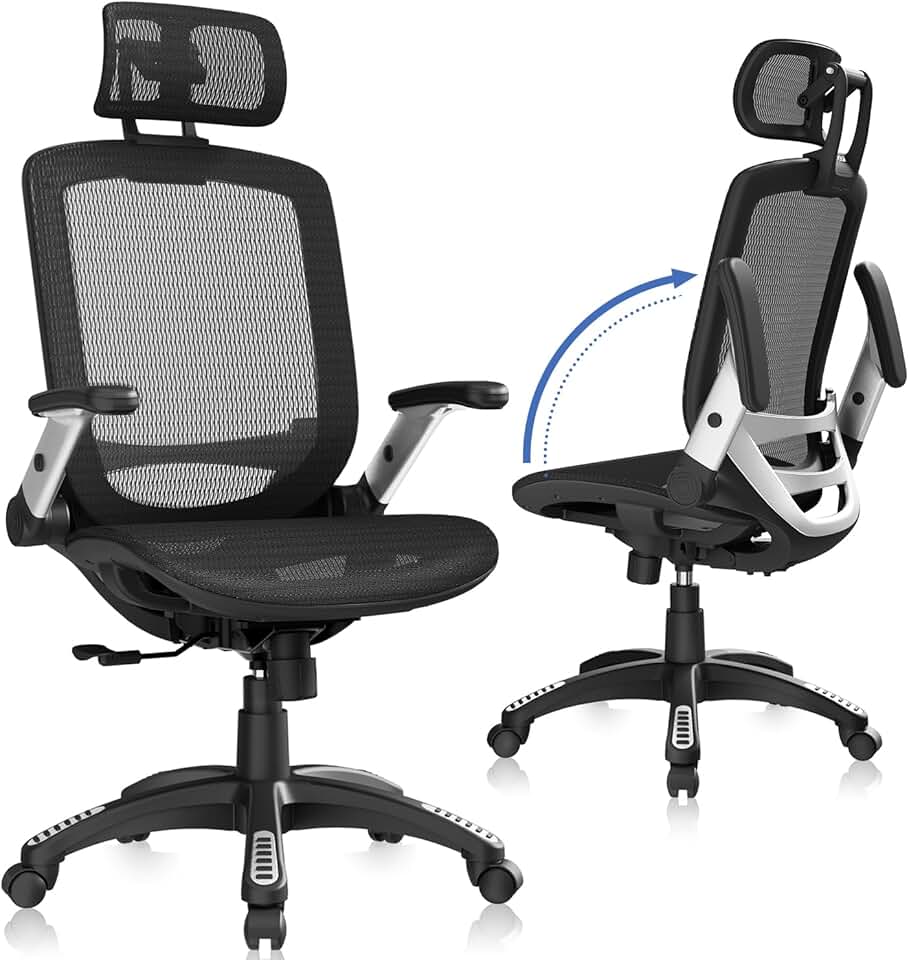
If you pair this desk with a chair like the GABRYLLY Ergonomic High Back Mesh Chair ($192.50) for seated work, you get a complete ergonomic setup for under $700 total - which is a genuinely good value proposition.
Best Premium Pick - Brödan Electric Standing L Desk
Price range: $999-$1,200
The Brödan is what L-shaped standing desks look like when the design team actually cares about both function and aesthetics. Most motorized desks look like workshop equipment. The Brödan looks like it belongs in the office. It's one of the few height-adjustable L-shaped desks that can credibly sit in a living room setup or visible home office without apology.
What you get: Heavy-duty motorized height adjustment, a thick desktop surface with real structural rigidity, reversible corner configuration (left- or right-hand setup), and enough surface area for creative studio or full workstation use. The weight capacity puts it in a different class from budget standing desks, making it suitable for dual-monitor arms, large audio equipment, or heavy computing setups.
The catch: At $999-$1,200, this is a commitment. If you move frequently, reassembly on motorized L-desks is genuinely annoying. And the premium price means you should be certain about your room layout before ordering - the return process on a 100+ lb desk is painful.
Who it's for: Serious home office users who spend 6-8 hours a day at their desk, have a permanent setup, and want something that performs and looks good in 2026 and beyond. Photographers, video editors, developers, and anyone with a heavy multi-monitor rig.
Pair it with the COLAMY High Back Executive Office Chair ($142.28) for an ergonomically matched seated experience that doesn't look out of place next to premium furniture.
Best Budget Standing Desk Add-On - Venace L-Shaped Standing Desk
Price range: Under $300
The Venace takes the top spot among budget L-shaped standing desks in 2026 for three reasons: the price is honest, the stability is better than most budget competitors, and the configuration is genuinely versatile. If your budget can't stretch to the SIAGO or Brödan but you still want height-adjustable functionality, this is the realistic best pick.
What you get: Affordable entry into standing desk ergonomics, a functional L-shaped surface, and the flexibility to reconfigure your setup.
The catch: At this price, the motor response and frame wobble will remind you that you didn't pay $1,000. Works best if you're not loading it with heavy equipment - keep it under 100 lbs of gear and it performs well.
Who it's for: Budget-conscious buyers who want the health benefits of height adjustability without premium pricing. Good for lighter setups - laptop, single monitor, accessories.
One Desk to Avoid
The PRAISUN 63 Inch L Shaped Desk keeps showing up in search results and product roundups, and it's worth flagging. The surface area is appealing on paper - 63" is a generous footprint. But across user feedback, the hardware quality at this price point consistently underdelivers. Bolt holes misalign during assembly, the surface finish shows wear quickly, and the frame stability is below average for its size category.
The issue isn't just build quality - it's the ratio of price to problem. At this price range, you can do better. The Sauder Cannery Bridge at a similar or slightly higher price gives you a real warranty and a manufacturer that stands behind their products. The PRAISUN feels like a desk designed to photograph well in Amazon listings, not to be used daily for three years.
Skip it. Spend the same money somewhere else.
How to Choose the Right L-Shaped Desk for Your Setup
Step 1 - Measure Your Corner First
Before you look at any desk specs, measure the two walls forming your corner. Account for doors, radiators, windows, and anything else that creates a real-world constraint. Most L-desks are sold with the assumption that both legs of the L are roughly equal - but your room may not be symmetrical. Look for reversible configurations if you're not sure which side needs to be longer.
Step 2 - Know Your Load
Add up the weight of everything that will sit on the desk. Two monitors at 12-15 lbs each, monitor arms at 5-8 lbs each, a desktop tower at 20-30 lbs, speakers, lighting, peripherals. You'll likely hit 80-100 lbs before you've put anything else down. Budget desks rated at 110 lbs are closer to the edge than the spec sheet suggests. If you're running a heavy workstation, 200 lb capacity should be your floor.
Step 3 - Decide Whether You Actually Need Height Adjustment
Standing desks are genuinely useful for people who use them. Research on sedentary behavior and musculoskeletal discomfort supports posture variation as a meaningful health intervention - but only if the mechanism is easy enough that you actually use it. If you know yourself and you know you won't manually crank a height adjustment twice a day, a fixed-height desk at the right height is more useful than an electric desk you never raise.
If you're between 5'4" and 6'0" and you sit at a standard chair, a 29-30" fixed desk will work fine ergonomically. Taller or shorter than that range, and height adjustment becomes more important.
Step 4 - Set Your Real Budget (Including the Chair)
The desk and the chair are a system. Spending $600 on a premium L-desk and then sitting in a $40 basic chair defeats the ergonomic purpose. A reasonable budget split for a full workstation: 40% desk, 40% chair, 20% accessories (monitor arm, cable management, lighting).
For reference, pairing the mid-range SIAGO standing desk with the GABRYLLY Ergonomic High Back Mesh Chair ($192.50) or the COLAMY High Back Executive Office Chair ($142.28) gives you a complete, ergonomically functional setup in the $500-$700 range without compromising on either piece.
Step 5 - Storage or Surface Area
These two things trade off against each other. Desks with built-in drawers and shelving (Sauder Cannery Bridge, AODK) sacrifice some pure surface area to give you organized storage. If your home office paperwork and equipment needs a home, that's worth it. If you're primarily running a digital-only setup and just need monitor real estate, go for maximum surface and add a separate storage unit if needed.
Step 6 - Material and Finish
For a permanent home office, laminate-over-MDF is a minimum. Avoid desks where the product description just says "wood" without specifics - that's usually thin particleboard that won't hold up to daily use. For rooms where the desk is visible from living spaces, furniture-grade finishes (like the Sauder line) are worth the premium. For dedicated office rooms where nobody cares what it looks like, raw function matters more.
Accessories Worth Adding to Any L-Shaped Desk
A good desk becomes a great workstation with the right additions:
- Monitor arm (single or dual): Frees up 12-18" of desk depth and eliminates monitor stand clutter. Essential for dual-monitor setups.
- Under-desk cable tray: A $15-25 cable tray mounted to the underside eliminates the cable disaster that happens otherwise.
- Desk pad/mat: Protects the surface and defines your primary work zone visually. Particularly useful on larger L-desks where the secondary surface becomes a dumping ground.
- Standing mat: If you're getting a height-adjustable desk, an anti-fatigue mat for standing periods makes a real difference for sessions over 30 minutes.
For seating, the budget tier starts at the Marsail Ergonomic Mesh Office Chair ($84.99) - acceptable lumbar support for the price. A step up, the SIHOO M18 Ergonomic Mesh Office Chair ($139.99) offers better adjustability and has held up well over extended use. For a premium pairing with a desk like the Brödan, the GABRYLLY Ergonomic High Back Mesh Chair ($192.50) is the most complete option in its price range.
The Bottom Line
Under $200: The Korfile 59" is the most practical budget pick for full-size setups. The AODK 53" if your room is small or storage matters more than surface area.
$200-$500: The Sauder Cannery Bridge wins on aesthetics and warranty if you don't need height adjustment. The SIAGO L-Shaped Standing Desk wins if standing desk functionality is the priority.
$500+: The Venace L-Shaped Standing Desk is the best budget standing option if you can't stretch further. The Brödan Electric Standing L Desk at $999-$1,200 is the clear premium choice - the only one worth the price if you're a serious home office user.
Whatever you pick, get the chair right too. The best L-shaped desk in the world won't fix a bad seating setup.