Photo by Vitaly Gariev on Unsplash
The Best Desks for Small Spaces in 2026 - Compact Picks That Actually Work
Most home office advice assumes you have a dedicated room. If you're working from a studio apartment, a bedroom corner, or a narrow spare room, the standard 60-inch executive desk recommendations are useless to you. You need something that fits your actual floor plan, doesn't make a small room feel like a closet, and still gives you enough surface to get real work done.
This guide covers the best small-space desks available in 2026, organized by type, with specific product picks, honest tradeoffs, and a clear framework for deciding what will actually work in your space.
 Photo by Pawel Czerwinski on Unsplash
What "Small Space" Actually Means for a Desk
Before spending money, get specific about your constraints. "Small space" covers a huge range of situations, and the right desk for a 90-square-foot studio corner is different from the right desk for a 120-square-foot spare bedroom.
Width is your most critical dimension. Desks between 36 and 48 inches wide hit the sweet spot for small spaces - wide enough for a monitor, keyboard, and notebook, narrow enough to not eat a wall. Under 36 inches starts to feel cramped for daily work; over 48 inches stops being "compact."
Depth matters more than most people realize. Standard desks run 24 to 30 inches deep. A 20-inch-deep floating desk looks great in photos but puts your monitor 6 inches closer to your face than ergonomics recommend. Aim for 20 to 24 inches of usable depth.
Height is mostly standardized at 29 to 30 inches for seated work. If you want sit-stand capability, a separate converter or a compact electric standing desk handles that without requiring a full standing desk footprint.
The 5 Desk Types Worth Considering - And When to Use Each
| Desk Type |
Best Fit |
Typical Width Range |
Key Tradeoff |
| Wall-mounted / floating |
Rooms under 100 sq ft, minimalist setups |
36-48" |
Requires installation; limited storage |
| Foldable / Murphy-style |
Shared spaces, part-time work setups |
24-40" |
Smaller surface; less sturdy |
| Ladder desk |
Rooms with high ceilings; need vertical storage |
36-48" |
Low surface area; not multi-monitor friendly |
| Compact standing desk |
5+ hours daily at desk; sit-stand needed |
40-55" (check footprint) |
Takes more floor space than other types |
| Standing desk converter |
Already own a desk; want sit-stand on a budget |
Sits on existing desk |
Only works if you have a base desk |
Corner/L-shaped desks didn't make this list. Yes, they have a high surface-to-footprint ratio in the right room, but in genuinely tight spaces - think under 120 square feet - they tend to dominate the room visually and physically. If you have a square room with two free walls, they can work. In most small-space scenarios, a straight compact desk is cleaner.
The Best Small-Space Desks in 2026
Price: $79.99
Width: 45 inches
Depth: 24 inches
The Furmax 45 Electric Height Adjustable Desk is the most affordable electric sit-stand option that still clears the bar for actual daily use. The 45-inch surface sits at the narrower end of the compact range, which is exactly what you want when floor space is at a premium. At 24 inches deep, you get enough room for a monitor arm or a monitor set back with keyboard and mouse in front.
Electric height adjustment means you'll actually use the sit-stand feature. Manual crank desks sound practical until you realize you're cranking 28 times twice a day and stop bothering. Research consistently shows that sit-stand desks only deliver health benefits when users actually alternate positions - which requires the lowest possible friction to switch.
The catch: At $79.99, the frame isn't as rigid as desks twice the price. If you're typing aggressively or using a heavy ultrawide monitor without an arm, you'll notice some wobble at standing height. For lighter setups - a 27-inch monitor, laptop, standard peripherals - it's fine.
Who it's for: Remote workers spending 5+ hours daily at a desk who want sit-stand functionality without a $300+ investment.
Price: $104.99
Width: 48 inches
Depth: 24 inches
The ErGear 48x24 Electric Standing Desk steps up from the Furmax in frame stability without stepping up much in price or footprint. The 48-inch width is the widest you should consider for genuinely small spaces - it gives you room for a dual-monitor setup or one wide monitor plus side space for a notebook or secondary items.
The 24-inch depth is standard and ergonomically sensible. Cable management is built into the frame, which matters more than it sounds - loose cables under a small desk look chaotic and make the space feel cramped. The programmable height presets mean switching from sitting to standing takes one button press.
The catch: At 48 inches, this is on the larger end for small-space desks. Measure your wall carefully. You need at least 54 to 56 inches of clear wall to account for the desk plus comfortable chair pull-out.
Who it's for: Anyone doing multi-monitor work in a tight space who needs sit-stand without a footprint larger than a traditional desk.
 Photo by Kim Tayona on Unsplash
Price: $113.99
Width: 55 inches
Depth: 24 inches
The Veken 55 Electric Standing Desk is technically outside the 48-inch upper limit for "compact" desks, but it earns a spot here because of who actually needs it: people with slightly larger rooms who are doing creative work or coding and need surface area but still want a small-space-conscious footprint depth-wise.
At 24 inches deep, it doesn't project far into the room despite the wider surface. The electric motor is responsive and the frame is meaningfully more stable than the Furmax at similar height settings. If you're spending serious time at this desk - video editing, software development, writing - the extra surface width pays off.
The catch: 55 inches is 55 inches. If your wall can't accommodate it, it can't accommodate it. Don't compromise on measuring.
Who it's for: Power users in small-but-not-tiny spaces who do production-type work and need surface real estate without a deep footprint.
Price: $99.99
If you already own a desk that works for your space but want to add sit-stand capability, a converter is the right move - not a new desk. The VIVO DESK-V000S Desk Converter is the most practical option in this price range.
It sits on your existing desk surface, raises and lowers via a spring-assisted lift mechanism (no electricity needed, no batteries), and folds back down flat when you want to use your original surface. The tiered design keeps your monitor at proper eye height when standing while your keyboard sits lower on the secondary platform - that separation is what makes converters ergonomically viable versus just stacking books.
The catch: Converters add height to your desk, which can be awkward in low-ceiling spaces. Also, the base footprint takes up roughly 28 x 24 inches of your desk surface, so your base desk needs to be at least 48 inches wide to give you the converter plus usable side space.
Who it's for: Anyone who already has a workable desk and wants sit-stand without replacing it.
Price: $179.99
The VIVO DESK-V042KB 42 Desk Converter is the step up from the V000S for people who need more surface width on the converter itself - particularly useful for dual-monitor setups where the V000S feels tight. The 42-inch width accommodates two standard 24-inch monitors or one ultrawide without everything feeling crammed.
The keyboard tray sits independently from the monitor platform, which is the correct ergonomic setup - your monitors should be at eye level while standing, and your keyboard should be at elbow height, and those two measurements are not the same number. Cheaper converters ignore this and just raise everything on one flat platform.
The catch: At $179.99 for a converter, you're paying converter premium pricing. For a few dollars more, the Furmax or ErGear standing desks give you a dedicated surface. Only worth it if you genuinely love your current desk and don't want to replace it.
Price: $99.99
Width: 48 inches
Depth: 24 inches
The Claiks 48 Electric Standing Desk covers the same footprint as the ErGear but comes in at $5 less. The differences between these two at this price point are minor - both have programmable presets, both use a dual-motor frame for stability, both have similar depth. The ErGear edges it on build rigidity slightly, but the Claiks is a legitimate alternative if it's in stock at a better price point on the day you're buying.
The catch: Same as the ErGear - at 48 inches you're at the limit of what qualifies as "compact." Worth noting the motor on budget-tier electric desks in this class tends to be louder than premium options. Not disruptive, but audible.
A Product to Avoid
This is not a bad product in absolute terms, but it's the wrong product for a small-space setup. The FITUEYES FSD308001WB Adjustable Standing Desk Converter is a large-footprint converter that requires a wide, deep base desk to function properly. In a small-space context where your desk itself might only be 40 to 48 inches wide, this converter dominates the surface and leaves you with essentially no usable desk space outside the converter platform.
At $111.99, you're also within range of a dedicated compact electric standing desk that gives you more surface and a cleaner setup. Skip this one unless you have a desk 55 inches or wider and specifically need a converter.
 Photo by Bedirhan Gül on Unsplash
How to Choose the Right Desk for Your Small Space
Step 1 - Measure the actual usable zone
Don't measure the wall. Measure the clear zone: wall to the nearest obstruction (door swing, closet, radiator). Then subtract 24 to 30 inches for chair pull-out. What's left is your maximum desk width. Write this number down before looking at any products.
Step 2 - Decide on sit-stand before anything else
If you're at a desk more than 5 hours a day, sit-stand functionality is worth the investment. The research linking prolonged sitting to cardiovascular risk and lower back issues is well-established enough at this point to take seriously. But sit-stand desks - even compact ones - have a larger footprint than static desks. If your usable zone is under 42 inches, a converter on a simple static desk might be smarter than a standing desk that barely fits.
Step 3 - Choose depth based on monitor setup
- Single monitor on stand: 20 inches minimum, 22 preferred
- Single monitor on arm: 18 inches is workable
- Dual monitors: 24 inches minimum
- Laptop-only: 18 to 20 inches is fine
Desk depth is often the dimension people underestimate. A 20-inch-deep desk with a monitor on a stand pushes the monitor 6 to 8 inches from your face at sitting height. That's too close for extended work.
Step 4 - Decide how much storage you actually need
Most small-space desk problems are actually storage problems in disguise. If you're buying a minimal floating desk and then stacking it with papers, notebooks, and charging cables, the desk isn't the issue - you need wall shelving or a nearby filing solution. Be honest about what will actually sit on the desk surface before choosing a desk with minimal built-in storage.
A desk with thin metal legs reads as lighter in a room than the same-sized desk with thick wood legs and a modesty panel. In small rooms, visual weight matters for livability. If you're choosing between two similar-sized desks, the one with an open-frame design will make the room feel less crowded.
The Chair Question
A small-space desk setup doesn't end at the desk. An oversized chair can visually overwhelm a compact workspace and eat into the floor space you saved by choosing a narrow desk. In small rooms, a mid-back or task chair with a smaller seat pan is usually the smarter choice than a big executive chair - both for space and for ergonomics at standard desk height.
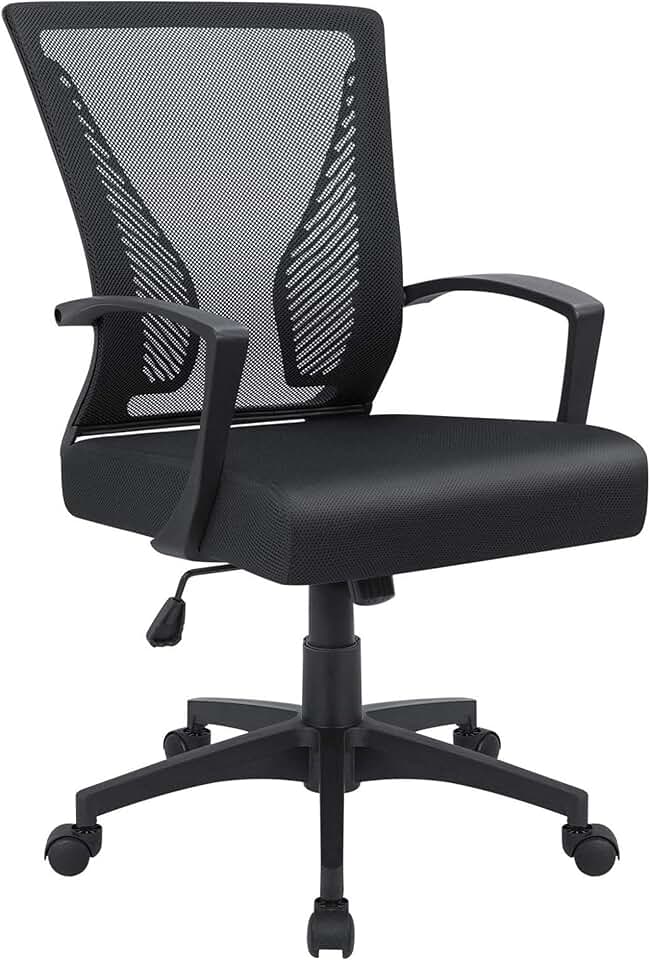
For anyone pairing a new compact desk with a chair purchase, the Furmax Mid Back Mesh Office Chair at $39.98 is the lowest-cost option worth considering for light use. For anyone spending full workdays at their desk, step up to something with proper lumbar support. The SIHOO M18 Ergonomic Mesh Office Chair at $139.99 offers adjustable lumbar and a compact footprint that suits small-space setups without the sprawling armrests of gaming-style chairs.
What to Do About Cable Clutter
Nothing makes a small desk space feel more chaotic than visible cables. A few practical fixes:
- Cable spine or raceway: Mounts under the desk and routes cables together toward a wall outlet. Costs $10 to 20 and makes a significant visual difference.
- Monitor arm instead of stand: Frees up 6 to 8 inches of desk depth and eliminates the power brick and stand base from the desk surface.
- Power strip with flat plug: Mounts under the desk or to the wall, keeps the outlet footprint off the floor.
The ErGear and Claiks standing desks both include basic cable management built into the frame, which is useful but not a complete solution. Plan your cable routing before you buy the desk - sometimes a USB-C dock or a different monitor placement changes where cables need to go.
Final Recommendations by Situation
Tightest budgets, small footprint needed: Furmax 45 Electric Height Adjustable Desk at $79.99 is the entry point for sit-stand that's actually usable.
Best all-around compact standing desk: ErGear 48x24 Electric Standing Desk at $104.99 gives you a stable 48x24 surface with good cable management and reliable electric adjustment.
Already have a desk you like: VIVO DESK-V000S Desk Converter at $99.99 adds sit-stand without a new desk purchase.
Wider room, production-type work: Veken 55 Electric Standing Desk at $113.99 stretches to a more capable work surface while keeping the 24-inch depth.
Dual monitors, converter preference: VIVO DESK-V042KB 42 Desk Converter at $179.99 handles side-by-side monitors on a converter properly.
The right answer for your space is the one that fits your measured wall space, supports your actual monitor setup, and doesn't require you to compromise on ergonomics. Buy the desk for the space you have, not the setup you see in YouTube desk tours.