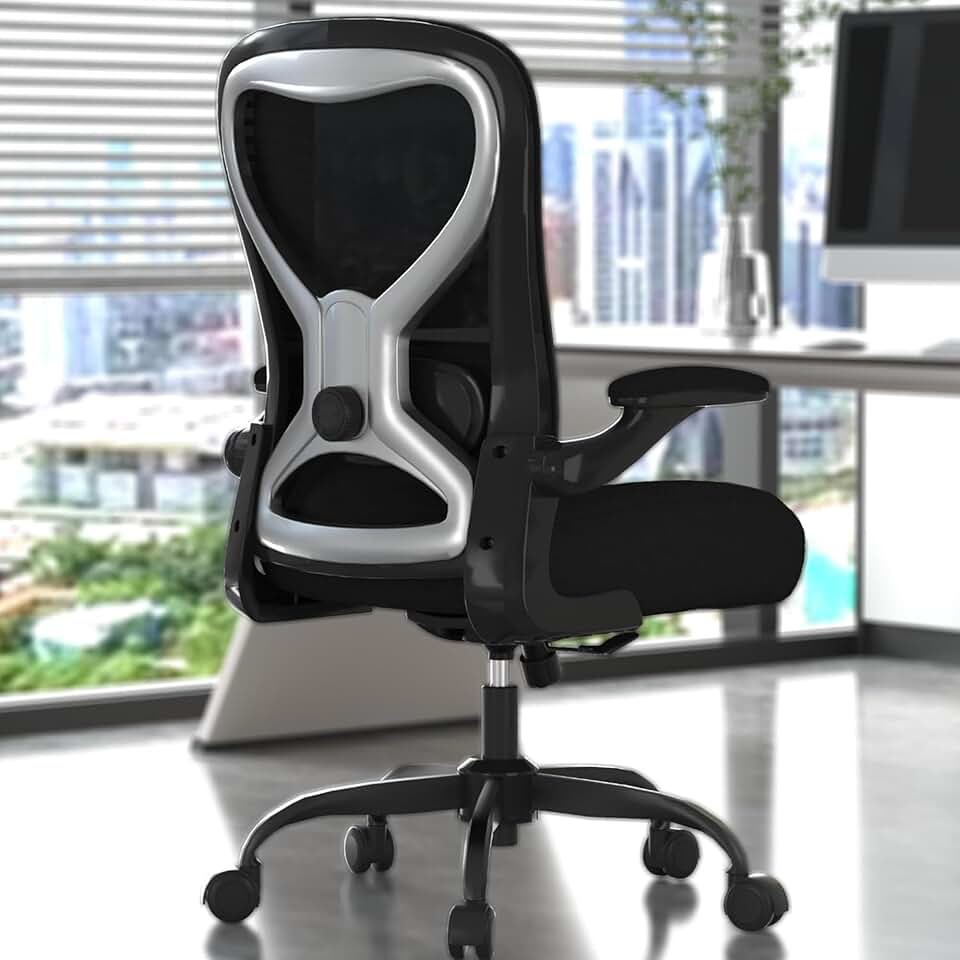
Office chair vs gaming chair - which is better for your back, budget, and setup? We break down ergonomics, comfort, price, and who should buy what in 2026.
Products Mentioned
Office Desk Chair
Solid $90 ergonomics for 6-hour days - nothing more, nothing less
As an Amazon Associate, we earn from qualifying purchases.
Office Chair vs Gaming Chair - Which Should You Buy in 2026
If you're shopping for a new seat in 2026, you've probably noticed the office chair vs gaming chair debate is louder than ever. Gaming chair brands have gone mainstream, showing up in home offices and college dorms alike. Meanwhile, ergonomic office chair makers keep pushing the boundaries of adjustability and spinal support.
So which one actually deserves your money? The honest answer is that it depends entirely on how you use your chair - but for most people working 6 to 10 hours a day, the research and real-world experience strongly favor ergonomic office chairs. Let's break down exactly why, and where gaming chairs still earn their place.
For a broader look at all our top-rated seating options, check out our full chair reviews and guides.
The Core Difference - What Each Chair Is Designed For
This is the part most buying guides skip over, and it matters a lot.
Ergonomic office chairs are engineered for sustained upright sitting. Every design decision - the mesh back, the adjustable lumbar, the multi-directional armrests - exists to keep your body in a neutral, supported position for hours at a time. These chairs are built around OSHA guidelines and decades of workplace ergonomics research. The goal is preventing musculoskeletal disorders, reducing fatigue, and keeping you productive.
Gaming chairs are engineered for immersion and comfort during gaming sessions. The deep bucket seat, the high backrest, the 135 to 180 degree recline - these features help you settle in for a 3-hour raid or a late-night streaming session. They're inspired by racing car seats, and that aesthetic carries real functional tradeoffs when you're trying to work upright at a monitor.
Neither design is wrong. They're just optimized for different activities. The problem arises when people buy a gaming chair expecting office chair performance, or vice versa.
Featured
Office Desk Chair
Solid $90 ergonomics for 6-hour days - nothing more, nothing less
This is the biggest differentiator between the two categories, and ergonomic office chairs win decisively for spinal health and posture during work.
Lumbar Support
Ergonomic office chairs like the Herman Miller Aeron, Steelcase Leap V2, and the newer Humanscale Freedom have integrated lumbar support that adjusts in height, depth, and sometimes firmness. It stays exactly where you set it, conforming to your spine's natural curve throughout the day.
Gaming chairs use removable pillows strapped to the backrest. These are positioned with a velcro strap or bungee cord, and they shift. Anyone who has owned a gaming chair for more than a few weeks knows the frustration of reaching back to reposition the lumbar pillow mid-afternoon. Beyond the inconvenience, a shifting lumbar cushion provides inconsistent support, which is precisely what ergonomics research warns against.
Armrests
Premium ergonomic office chairs come with 4D armrests - adjustable in height, width, depth, and pivot angle. This lets you position your arms so your shoulders drop, your elbows rest naturally, and your wrists stay neutral while typing. For anyone doing long keyboard and mouse sessions, this matters enormously.
Most gaming chairs offer 2D or 3D armrests at best. Height adjustment is standard, and some models add a basic pivot or fore-aft slide. But the range of motion is narrower, and the padding, while soft, doesn't always position your arms in the right place for a desk setup.
Seat Depth and Tilt
Seat depth adjustment - the ability to slide the seat pan forward or back - is something most serious ergonomic office chairs include and almost no gaming chairs offer. This is critical if you're tall or short, because sitting with the correct seat depth prevents pressure behind the knees and supports the full length of your thighs.
Ergonomic chairs also feature tilt tension control and synchro-tilt mechanisms that let the seat and back recline together at a healthy ratio, encouraging subtle movement rather than static sitting. Gaming chairs recline dramatically, which is great for watching a movie but actively counterproductive for working at a monitor.
Comfort for Long Hours - The Reality Check
Gaming chairs often feel more comfortable when you first sit in one. The thick foam padding and plush upholstery create an immediate sense of luxury. But initial comfort and sustained comfort are very different things.
Breathability
Most gaming chairs use PU leather or vinyl upholstery. It looks sleek and wipes down easily, but it traps heat. After two or three hours, you'll notice your back getting warm and clammy, especially in warmer climates or during summer months.
Ergonomic office chairs with mesh backrests - like the Aeron's 8Z Pellicle mesh or the Leap's fabric back - allow continuous airflow across your entire back. The difference on a warm afternoon is immediately noticeable. Your back stays cooler and drier, which directly reduces fatigue.
Foam Longevity
Gaming chairs use high-density foam that compresses over time. After 12 to 18 months of daily use, many users report the seat cushion has flattened noticeably. The chair that felt plush at month one feels noticeably firmer and less supportive by year two.
Premium ergonomic office chairs use high-resilience foam and suspension mesh systems that maintain their shape and support characteristics far longer. The Steelcase Leap, for example, is backed by a 12-year warranty partly because the materials are designed to hold up under daily use for that entire period.
The Sweet Spot for Each Chair Type
Use Case
Office Chair
Gaming Chair
8+ hour workday
Excellent
Struggling by hour 4-5
2-4 hour gaming session
Adequate
Excellent
Hybrid work/gaming
Good with right model
Compromised for work
Watching movies/streaming
Okay
Very comfortable
Video calls and focus work
Excellent
Acceptable
Ergonomic Office Chair
Solid $189 starting point - not your forever chair
Price Comparison - What You Actually Get Per Dollar
The price ranges overlap more than most people realize.
Gaming chairs typically run from $200 to $800+. Brands like Secretlab (the Titan Evo 2025), Corsair, and DXRacer dominate the mid to upper range. The Secretlab Titan Evo remains one of the best gaming chairs on the market, with genuine quality construction and better-than-average ergonomics for the category.
Ergonomic office chairs range from $150 to $1,000+. Budget options like the Branch Ergonomic Chair and the Flexispot BS14 Pro offer solid adjustability under $400. Mid-range options like the Humanscale Diffrient World sit around $500 to $700. Premium options like the Herman Miller Aeron and Steelcase Gesture hit $1,000 to $1,600 new, though refurbished versions are widely available for $400 to $700.
Here's the honest value comparison. At the $300 to $500 price point, a good ergonomic office chair like the Branch Ergonomic Chair or the Autonomous ErgoChair Ultra will typically outperform a gaming chair in adjustability, breathability, and long-term support. You're getting better lumbar adjustment, better armrest range, and better materials for sustained sitting.
At $600 and above, the gap widens further. A $700 Secretlab chair is well-made and impressive looking, but a $700 Humanscale or refurbished Aeron will do more for your back over a 40-hour work week.
The one area where gaming chairs justify their price is if you genuinely value the aesthetic, the deep recline for media consumption, and the high backrest for shoulder and neck contact during leaned-back gaming. For that specific use case, the value equation shifts.
Side-by-Side Feature Comparison
Feature
Ergonomic Office Chair
Gaming Chair
Lumbar Support
Integrated, adjustable height and depth
Removable pillow, prone to slipping
Breathability
Mesh back allows airflow
Leather or fabric traps heat
Armrests
4D multi-directional
2D or 3D basic adjustment
Seat Depth Adjustment
Standard on most models
Rarely available
Recline Range
Controlled tilt, upright-focused
135 to 180 degrees
Long-Hour Comfort
Excellent for 8+ hours
Better for 2 to 6 hour sessions
Foam Durability
High-resilience, holds shape
Compresses over 12 to 18 months
Aesthetics
Minimal, professional
Bold, racing-inspired
Warranty
Often 10 to 12 years on premium models
Typically 2 to 5 years
Best For
Office work, remote work, all-day use
Gaming, streaming, media consumption
ELABEST X100 Mesh Chair with Footrest
17-point adjustability and a footrest at $320 - finally a tall-person chair that delivers
Work from home or in an office for 6 or more hours per day
Have existing lower back pain, shoulder tension, or posture issues
Run video calls and need to look professional on camera
Work at a standing desk and need a chair that complements active sitting (pair it with a good standing desk setup)
Want a chair that will still feel great in 5 years
Prioritize breathability and temperature comfort
Need precise lumbar and armrest adjustability to dial in your fit
For this group, start your search with the Branch Ergonomic Chair at the value end, the Humanscale Freedom in the mid-range, or the Herman Miller Aeron or Steelcase Leap V2 if you want the gold standard. Browse our full ergonomic chair recommendations for detailed comparisons.
Primarily use your chair for gaming sessions of 2 to 5 hours at a time
Love the aesthetic and want it to match your gaming setup
Frequently recline to watch content or take breaks
Want built-in head and neck support for leaned-back positions
Aren't doing intensive keyboard or mouse work that demands precise arm positioning
Stream and want a visually striking background element
In this case, the Secretlab Titan Evo 2025 is the most ergonomically thoughtful option in the gaming chair category, with a magnetic lumbar pillow system and better-than-average seat adjustment. The Corsair TC500 Luxe is another strong contender for build quality. See our full gaming chair reviews for the current rankings.
Office Desk Chair
Sub-$100 seating for shorter frames - honest about its limits
If you genuinely need one chair that handles both a full workday and evening gaming sessions, you have two good paths.
Path 1 - Choose a high-quality ergonomic office chair with a high backrest and generous recline. The Steelcase Gesture and Herman Miller Embody both recline meaningfully and provide head support options. They won't go flat like a gaming chair, but they're comfortable for gaming in a more upright position.
Path 2 - Look at hybrid chairs like the Secretlab Titan with the lumbar adjustment module or newer crossover designs from brands like Noblechairs that incorporate more genuine ergonomic engineering into a gaming chair format. These won't fully match a dedicated office chair for workday ergonomics, but they're the best of the gaming category for dual use.
Pairing either choice with good desk accessories - a monitor arm, a keyboard tray, a footrest - can significantly reduce the ergonomic compromise regardless of which chair you choose.
The Honest Bottom Line
For the majority of people reading this in 2026 - remote workers, hybrid workers, freelancers, and anyone sitting at a computer for most of the day - an ergonomic office chair is the better investment. The integrated lumbar support, the breathable mesh, the precise adjustability, and the long-term durability all point in the same direction.
Gaming chairs aren't bad products. The best ones are genuinely well-made and comfortable for their intended purpose. But their intended purpose is gaming and relaxation, not an 8-hour workday. Buying a gaming chair for your home office because it looks impressive is like buying running shoes for hiking - there's overlap, but you're working against the design intent.
If you're building a dedicated gaming setup and you game more than you work at that desk, a quality gaming chair makes total sense. For everyone else, spend that same money on an ergonomic chair and your back will thank you by lunchtime.
Ready to choose? Start with our full chair guide for side-by-side comparisons across every category and budget.
Not inherently, but they're not optimized for long work sessions. The removable lumbar pillows shift and provide inconsistent support, and the bucket seat design encourages a reclined posture that's fine for gaming but counterproductive for desk work. Research shows gaming chairs can reduce muscle stiffness during gaming postures, but ergonomic office chairs are better aligned with OSHA guidelines for preventing musculoskeletal disorders during extended work sessions. If you're sitting for 8 hours a day, a proper ergonomic office chair is the safer long-term choice for your spine.
You can, but you'll likely notice limitations within a few weeks. The heat buildup from the leather upholstery becomes uncomfortable in long sessions, the lumbar pillow tends to shift, and the limited armrest adjustability can cause shoulder and wrist tension during heavy keyboard use. If you want to use one chair for both work and gaming, look at top-tier gaming chairs like the Secretlab Titan Evo 2025, which incorporates more genuine ergonomic features than most in the category. Alternatively, a high-quality ergonomic office chair with a generous recline, like the Steelcase Gesture, handles both uses more gracefully.
The Branch Ergonomic Chair is one of the best options under $400, offering adjustable lumbar support, 4D armrests, and seat depth adjustment that you typically only find on chairs costing much more. The Flexispot BS14 Pro and the Autonomous ErgoChair Pro are also worth considering in this range. All three offer significantly more adjustability and breathability than a gaming chair at the same price point. Check our ergonomic chair guide at /chairs/ergonomic for current pricing and detailed comparisons.
Generally, no. The foam in most gaming chairs begins to compress noticeably after 12 to 18 months of daily use, reducing the seat cushion's support and comfort. The PU leather upholstery is also prone to cracking and peeling after 2 to 3 years, especially in warmer climates. Premium gaming chairs from brands like Secretlab use better materials that last longer, but they still typically trail high-end ergonomic office chairs in longevity. Herman Miller and Steelcase back their premium chairs with 10 to 12 year warranties because the materials are built to match - that's a meaningful real-world difference.
Yes, if gaming is your primary use case. For 2 to 5 hour gaming sessions, the deep recline, padded high backrest, and neck pillow of a gaming chair genuinely improve comfort compared to a basic non-ergonomic desk chair. The immersive, reclined position gaming chairs encourage is well-suited to gaming focus and endurance. Just pair it with proper monitor height, a good desk setup, and take movement breaks. If you also work at that desk during the day, consider investing in a more ergonomic option or at least adjusting the lumbar and backrest angle to a more upright position during work hours.
A solid starting point is $300 to $500 for a chair you'll use all day. At this range, you can get genuine ergonomic adjustability including adjustable lumbar, 4D armrests, and seat depth - features that make a real difference over 8 hours. If your budget stretches to $700 or more, refurbished Herman Miller Aeron and Steelcase Leap chairs become available and offer excellent long-term value. Avoid going too cheap - a $100 to $150 chair, whether labeled ergonomic or gaming, will typically lack the adjustability and material quality to support you properly over a full work year.
An ergonomic office chair pairs much better with a standing desk setup. When you alternate between standing and sitting throughout the day, you want a chair that quickly and precisely adjusts seat height, offers controlled tilt for active sitting, and supports good upright posture for the seated periods. Ergonomic office chairs with synchro-tilt mechanisms encourage subtle movement even when seated, which complements the active philosophy behind standing desk use. Gaming chairs, with their focus on deep recline and static comfort, work against that dynamic sitting approach. Browse our standing desk accessories guide at /accessories for footrests, monitor arms, and other items that improve your full setup.
For most people who sit for more than four hours a day, no - gaming chairs fall short of purpose-built ergonomic office chairs. Gaming chairs typically offer fixed lumbar pillows and limited adjustability, while chairs like the Herman Miller Aeron or Steelcase Leap include dynamic lumbar support and multi-axis armrests designed around long-term posture research. If your priority is comfort during extended work sessions, a dedicated ergonomic office chair wins on nearly every measurable point.
People with scoliosis generally do better in chairs with independently adjustable lumbar support and a flexible backrest that contours to an asymmetrical spine - the Steelcase Gesture and Herman Miller Embody are two of the most recommended options by physical therapists. Gaming chairs are a poor fit for scoliosis because their rigid bucket-seat design and fixed lumbar pillows apply uniform pressure that can aggravate uneven spinal curves. Always consult a physiotherapist before choosing a chair, since scoliosis severity and curve direction vary significantly between individuals.
Yes - a properly adjusted ergonomic chair can reduce sciatic nerve pressure by promoting a neutral pelvic tilt and preventing the slouching that compresses lumbar discs. Chairs with a waterfall seat edge, adjustable seat depth, and firm lumbar support, such as the Humanscale Freedom or Haworth Fern, are particularly effective at reducing symptoms during long sitting sessions. That said, no chair eliminates sciatica on its own, and combining a good chair with regular standing breaks and targeted stretching produces far better outcomes than chair choice alone.
For work, an ergonomic office chair is the better choice in almost every scenario - chairs like the Herman Miller Aeron or Secretlab Titan Evo's more adjustable configurations are built to reduce fatigue and musculoskeletal strain over hours of use. Gaming chairs prioritize aesthetics and short-session comfort, which makes them appealing but functionally inferior for eight-hour workdays. The one exception is if you are primarily gaming for two to three hours at a time and want a chair that fits a specific desk aesthetic - in that context, a quality gaming chair like the Secretlab Titan Evo is a reasonable pick.